INDEPENDENT • VEHICLE-FIRST • PRACTICAL BUYING GUIDES
VFVehicleFit Automotive

PARKED RECORDING · CHECKED OCTOBER 16, 2026

Vantrue N4 Pro S parking mode, explained.

Plan the power source before buying. Parking mode needs a compatible continuous supply; a camera plugged into a socket that switches off cannot keep monitoring.

See N4 Pro S buying options ↗

As an Amazon Associate I earn from qualifying purchases. Affiliate disclosure

Choose what you want to capture.

Modes described in Vantrue’s N4 Pro S manual; firmware may change options
ModeWhat it doesPlanning consideration
Collision detectionTriggers recording from a detected impact or movementDo not assume every light contact will trigger a clip
Motion detectionRecords detected movement in the monitored viewA busy scene may create many clips
Low bitrateContinuous recording at reduced bitrateUseful when an ongoing record matters more than driving-quality detail
Low frame rateCaptures fewer frames over timePrioritizes an overview over smooth motion

The N4 Pro S manual, Parking Mode section explains continuous power, mode selection and firmware-dependent controls.

POWER AND BATTERY

Set a stopping point.

Have your installer confirm a compatible hardwire kit, its battery-protection settings and the vehicle’s electrical requirements. Ask which conditions stop recording and how those settings suit your driving pattern.

There is no dependable “records all weekend” promise for every car. Battery condition, parked time, temperature and the chosen recording mode belong in that conversation. If the car sits for days, explain that before installation.

Vantrue recommends its ACC hardwire kit for ignition-linked switching; another brand’s ACC wiring may not communicate correctly. Use a qualified installer if fuse selection or safe cable routing is uncertain.

Read the installation checklist →

If parked recording stops, check these first.

  1. Confirm the selected power accessory remains active after shutdown.
  2. Check the camera’s parking mode, entry method and firmware against its manual.
  3. Ask the installer whether the power kit’s cutoff or a recording-duration setting has been reached.
  4. Check card errors and review the saved clips before changing several settings at once.

Vantrue’s manual advises switching the camera off when cabin temperature reaches 60°C / 140°F. Parked recording should not be treated as a guarantee that every event will be captured.

Parking mode is not the same as remote viewing.

A useful question before ordering is whether you want footage to review later or live access while away. Do not assume the standard Wi-Fi camera package provides both. Confirm any remote-access hardware, service requirements and running costs separately.

Review camera features and box-content checks →

CHOOSE YOUR REAR CAMERA

Same model name. Two setups.

Start with where the rear camera will go. Then check the selected package on Amazon.

As an Amazon Associate I earn from qualifying purchases. Affiliate disclosure

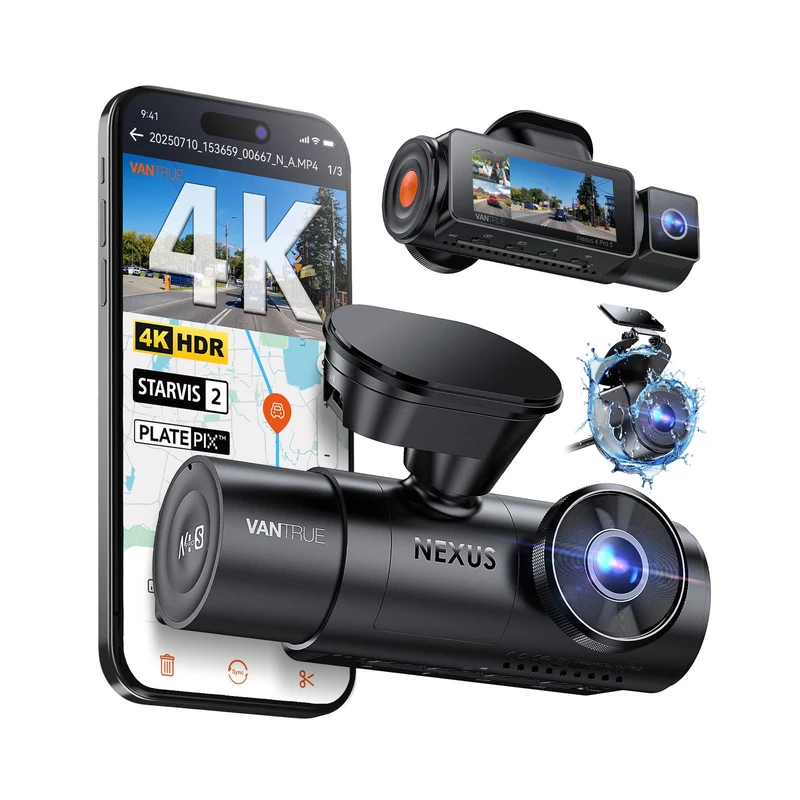
Vantrue N4 Pro S main camera with the cylindrical RC18 interior rear camera
01 / RC18

Inside rear-camera setup

For a camera mounted inside the vehicle, looking through the rear glass. Check the mounting position and cable route first.

  • Amazon listing identifies the RC18 rear camera
  • 4K front + 1080p cabin + 2.5K rear recording
  • Do not assume an exterior weather rating
Buy on Amazon
Vantrue N4 Pro S main camera with the IP67 weather-rated rear camera
02 / IP67 · RC09

Weather-rated rear-camera setup

For buyers who need the listing’s IP67 rear camera, including installations that may place the rear unit outside.

  • Amazon listing identifies the IP67 / RC09 rear camera
  • 4K front + 1080p cabin + 2.5K rear recording
  • Check exterior mounting and cable requirements
Buy on Amazon

Check current price, seller, selected variant and box contents on Amazon. Memory cards and parking-mode power accessories may be separate.

Which rear camera should I choose?
Sources & how this guide was prepared

Researched October 16, 2026 using manufacturer specifications and the two Amazon listings. This is a research guide; we have not conducted a hands-on test. Packages can change. The manufacturer’s current IP67 rear camera description and Amazon’s RC09 listing do not give identical sensor details, so we do not treat every package as the same hardware.